11.5.1.1 Single Step vs Multiple Step Lockouts
CCMS has two different methods to Lock Out an estimate period for projects which contain multiple tasks:
- Single-Step Lockout – All lock out activities occur in a single transaction and can be completed in a single user operation. This is the default lock out method and is appropriate to use on all but a VERY FEW projects.
- Multiple-Step Lockout – One or more separate user actions, frequently by different users, are required to lock out an estimate period.
However, on larger contracts, there may be a need to have individual Estimate Set Managers lock out each Project (Task Order) before the entire Progress Payment is locked out for the Contract. This is known as a Multiple Step Lockout. When a contract is using the Multiple Step lockout the Task Order section and grid will display one additional status column. The Status column indicates the locked status for each Task Order under the main contract.
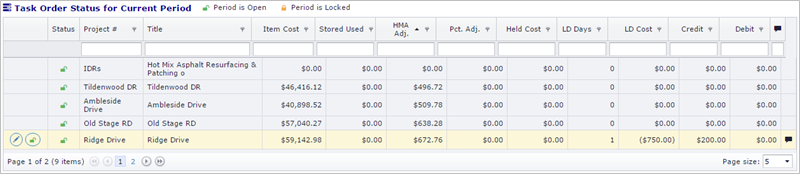


 Edit Button: Use this button to change the Liquidated Damage, Credit/Debit Settings for the selected project (Task Order). The entire estimate will automatically be recalculated.
 Lockout Button: Use this button to Lockout the current period for the selected project (Task Order). If the CCMS database detects errors with the current progress period, a report will be displayed, and the lockout action will be canceled. Any errors must be corrected before the lockout can be applied.
Once all projects (Task Orders) under the Estimate Set have been locked out, the entire progress period for any Estimate Set under the contract can be locked out.
Next Topic: Unlocking Progress Payments