11.6.1 Approval Workflow
CCMS uses a progress payment workflow to navigate through the approval process. Default Progress Payment workflows have been setup and can configure based on organization, department and\or progress payment type. Additionally, it is possible to setup a different Progress Payment workflow for specific projects. Refer to the CCMS Administrator's Guide.
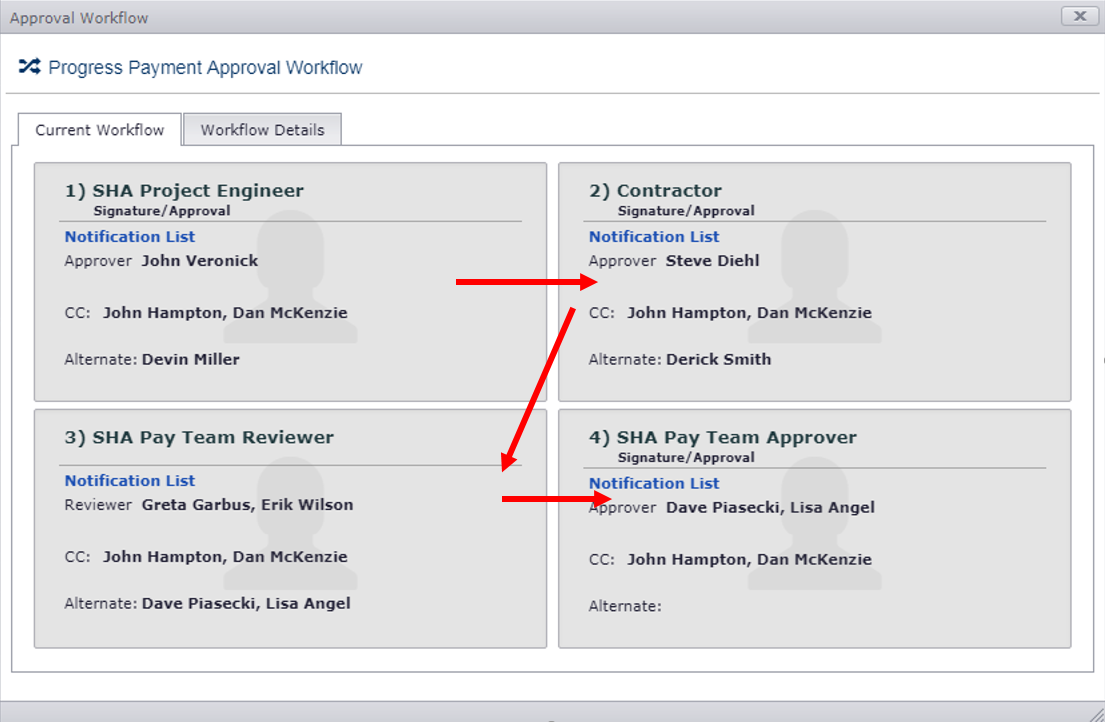
The Approval Workflow form displays this user workflow and user notification details for the approval of a progress payment. The Approval Workflow button is on the Current Estimate page which will be used for the current estimate period when it is locked out. This form may also be accessed from the Approval Workflow on the grid action button on the Estimates Awaiting Approval tab page.
The Current Workflow tab displays a box/frame for each workflow step in the approval workflow. Each box indicates:
- Title of the reviewer/approver (i.e. SHA Project Engineer).
- Approver – One or more users who can perform the approval action for the workflow step. This user(s) will be notified by emailed when their approval workflow action becomes “ball-in-court”.
- Alternate: Zero or more users who may act as an alternate reviewer/approver, in the event the primary Reviewer/Approver is not available. These users are CC’d.
- CC – Zero or more users who will be CC’d on all notification emails during the approval.
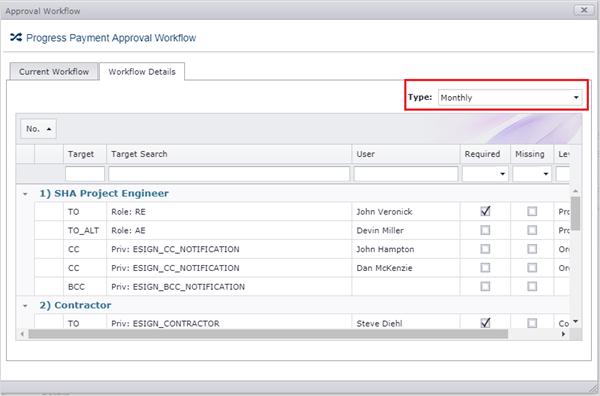
The Workflow Details tab lists a more details on the workflow definition and is intended primarily for CCMS Contract Managers and Administrators. This form allows you to navigate between different Progress Payment types defined for the contract’s organization and department (i.e. office, district, etc.).
WARNING: If any records are flagged as missing the CCMS Administrator should be notified to correct the problem. The problem must be corrected before the next estimate period can be locked.
Next Topic: Progress Payment Approval