13.6.1 Calculating and Saving Pay Adjustments
Authorized users can add/modify Pay Adjustments using the Adjustment Editor.
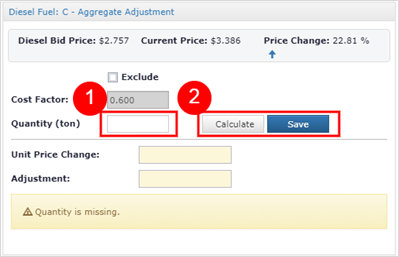
- Enter the appropriate adjustment factor into the provided input field.
Note: The adjustment factor field will vary between adjustment types. The figure above shows the adjustment in Quantity (ton) for a Diesel Fuel C- Aggregate Adjustment type.
- Click the Calculate button to view the resulting adjustment. The Calculate button will update the Unit Price Change and Adjustment fields located below the buttons. This action does not “Save or Apply” the adjustment to the IDR Item record.
Click the Save button to apply the adjustment to the IDR Item record. After the save is complete the Adjustment Type grid will be updated with the value entered.
Note: In the event a user changes the quantity on an IDR Item entry associated with an adjustment, the adjustment will be automatically recalculated if possible. In the case where the adjustment requires details (like the above Diesel Fuel Type C adjustment, the additional property (Quantity (ton) is cleared and must be reentered. This can only occur is working with IDR Items associated with the current estimate period.
Next Topic: Contract Modifications