13.6 Pay Item Adjustment
CCMS has the ability to easily calculate and manage many different types of adjustments associated with pay items. The table below lists the types of adjustments fully supported within CCMS. Adjustments for any contract must be configured during contract setup, which is covered in the eMCMS Contract Manager document.
Adjustment Type |
Adjustment Type |
Crack Seal |
HMA Price Index |
Emulsified Liquid Asphalt |
HMA Density |
Percent Pay |
HMA Mix Pay |
Diesel Fuel: A – Excavation |
Paving Fabric |
Diesel Fuel: B - Structural Concrete |
Slurry Seal |
Diesel Fuel: C – Aggregate |
Slurry Seal Asphalt Binder |
Diesel Fuel: D – HMA |
Slurry Seal Mix |
Diesel Fuel: E – Pavement Concrete |
Slurry Seal Application Rate |
HMA (All adjustments except Diesel) |
Many adjustment types (e.g. HMA Price Index and most Diesel Fuel adjustments) require no additional user interaction to allow CCMS to calculate adjustment costs. Other adjustment types (e.g. HMA Density and HMA Mix Pay) require the input of additional details regarding the specific material placement and/or testing, to calculate the adjustment costs. The Pay Item Adjustments page provides authorized users an overview and toolset to manage and calculate the adjustments associated with specific IDR Pay Item usage entries.
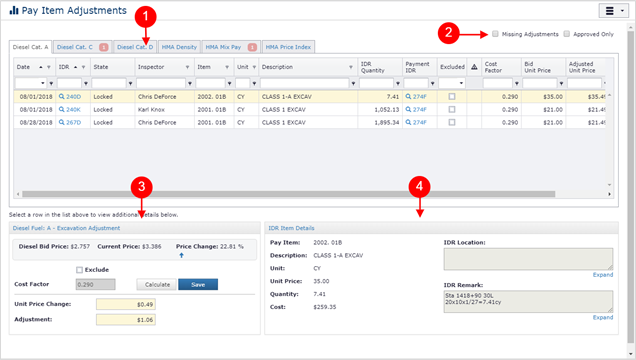
- Pay Item Adjustment Tabs: The Pay Item Adjustments page will display a tab for each Item Adjustment Type defined for the contract. You will only see the Adjustment Type tabs for the item adjustment types specifically configured for the contract.
Each Adjustment Type tab displays a grid containing related IDR Pay Item usage records.

The red badge located in the tab strip indicates the Adjustment Type contains IDR records which need to be addressed/adjusted.
- Filters: Use the checkbox filters to reduce the list of IDR Pay Item usage records.
- Missing Adjustments – Check this box to filter the list to show only the IDR Pay Item usage records which are missing adjustment data.
- Approved Only – Check this box to show only IDR Pay Items which have been approved.
- Adjustment Editor: The adjustment panel editor displays the appropriate editor for the adjustment type. The editable fields in this panel are specific to each adjustment type.
- IDR Item Details: This panel displays read only information regarding the IDR Pay Item usage.
Next Topic: Calculating and Saving Pay Adjustments