-
To add a crew to an IDR:
- Tap the Crews menu item.
- Tap Add, (The Add Crew form will appear)

Figure 17 – Crew Name field. Select existing crew from drop down list
- Click the Select Existing Crew… text in the Crew Name field to view a list of available crews
- Click the desired crew name in the list
- If the desired crew name is NOT available:
- Click Clear to close the list
- Press Plus icon on Crew Name line and enter the new crew name as shown in Figure 18.
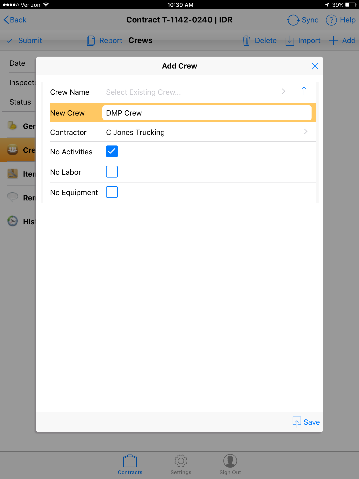
Figure 18 - New crew 'DMP Crew'. No Activities this entry
- Select the contractor for the crew from the Contractor field pick list.
- Check the No Activities, No Labor or No Equipment box if any do not apply for the crew.
- Tap Save