13.3.2.1 Item Ledger / Editing Usage
To edit the stored material usage, select an IDR Item entry in the above IDR Pay Item Material Store Usage grid. This action will display a list of all material stores for the select pay item in the lower Material Store Usage for select IDR Item grid. Click the Edit link in the upper right corner of the grid.

The Stored Material Allocation page will be displayed. The upper two frames show pay item details and the current details for item and stored usage. The lower grid displays all stores associated with the pay item.
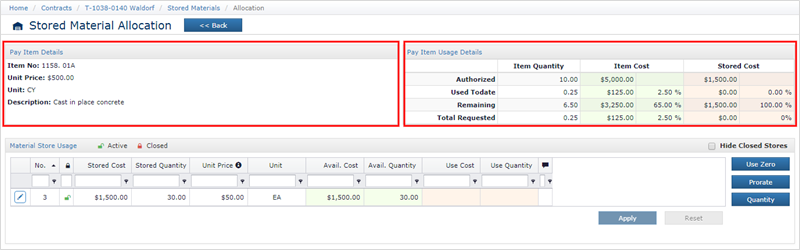
The Hide Closed Stored checkbox may be clicked to hide any material stores which have been exhausted.

The stored material usage can be initially set by clicking one of the buttons on the right side of the grid.
- Use Zero – Click if you do not which to use any stored material for this IDR Item.
- Prorate – Click to calculate a prorated stored material usage amount. This amount represents the amount to use so the remaining material store and remaining authorized quantity were to run out at the same time.
- Quantity – Click to use the IDR Item quantity amount
Note: The application requires you to click one of the above options, even if none provide the desired amount. In this case click Use Zero and edit the records individually (see below).
Note: By default, material is removed from a store in First-In-First-Out fashion. In other words, if a pay item has 2 material stores, the first created store will be used up first before starting on the second.
Once one of these options is clicked the Material Store Usage grid will display the selected amounts. You then can edit the individual Stored Material usage records, by clicking the Edit button in front of the usage entry.

Doing so, displays the Material Store Use form below.
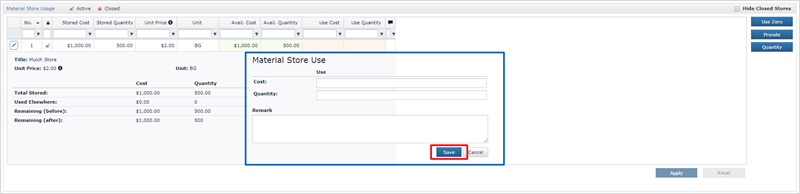
- This form provides the ability to enter:
- Cost – Cost of the stored usage to use
- OR
- Quantity – Quantity of the stored usage to use
- Remark – Optional remark
Click Save to save the usage.
Next Topic: Payment Holds