-
Some contracts have a requirement in which certain Site condition attributes should be recorded by each Inspector as part of the daily IDR entry process. Currently the following two site conditions are managed by CCMS:
- Soil conditions
- Stream/Tide conditions
Either or both site condition fields may be disabled by the Contract Administrator. Disabled site condition fields are not displayed.
To enter the Site conditions:
- Select the IDR date using either the IDR History or Calendar view option.
- In General tab, Tap the Stream Conditions drop down and select the most appropriate choice. If no stream is present, select the N/A choice.
- Tap the Soil Conditions drop down and select the most appropriate choice.
- Tap Save
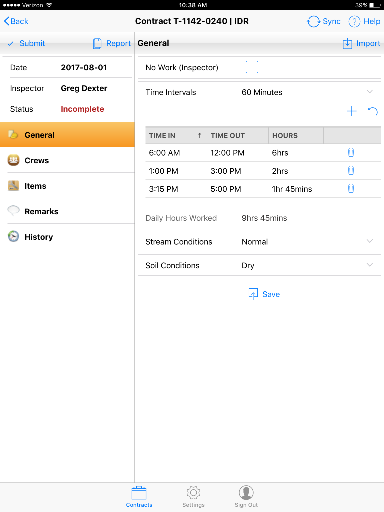
Figure 16 - IDR General tab showing Site Conditions