11.4.4 Scenario #4 Task Order with Multiple Prime Contractors
The diagram below shows a Task Order Contract with three prime contractors. Each prime contractor needs their own progress payment estimate, so multiple Estimate Sets must be used. In this example, the objects under Estimate Set level show different configurations available as required by the specific needs of the contract task.
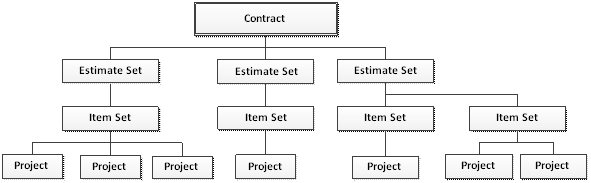
The configuration modeled above can reflect a combination of the operations and interfaces shown in Scenarios 1-3. The main difference to note in this scenario is the use of multiple Estimates Sets. When multiple Estimate Sets are utilized then a progress payment must be created for each prime contractor. The Estimate Set and Prime Contractor represent a one-to-one relationship in the CCMS database.
The Estimate Set Manager can easily switch between the Estimate Sets (i.e. Contractors) for a contract by selecting the appropriate entry in the Estimate Set drop down menu.
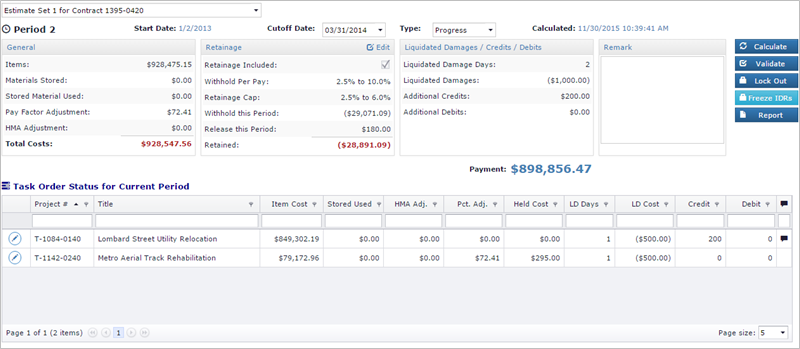
Selecting an Estimate Set will refresh the values shown in the Current Period, Task Order Status, and Locked Periods sections. The Estimate Set Manager can adjust the values for the current period as shown in Scenarios 1-3.
Next Topic: Estimate Lockout