14.1.2.3 Create NEW Pay Item for Existing Base Item
Select this option to create a new pay item for an existing base item in the contract.
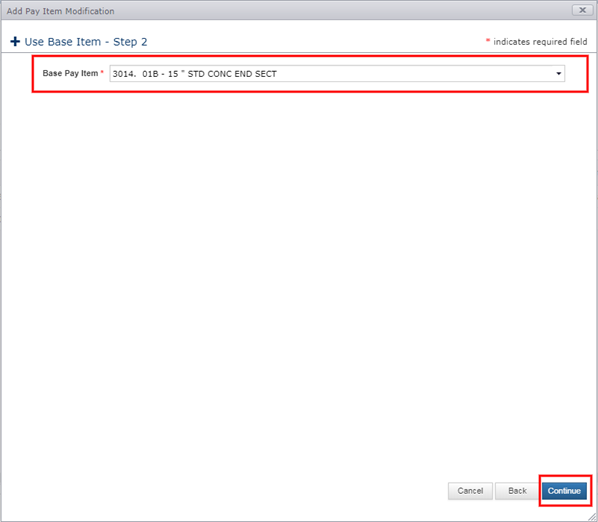
- Select the Base Pay Item from the list. The new Pay Item created from this base item will inherit the following attributes from the base pay item:
- Index Number
- Unit
- Unit Price
- Category Code
- Click Continue.
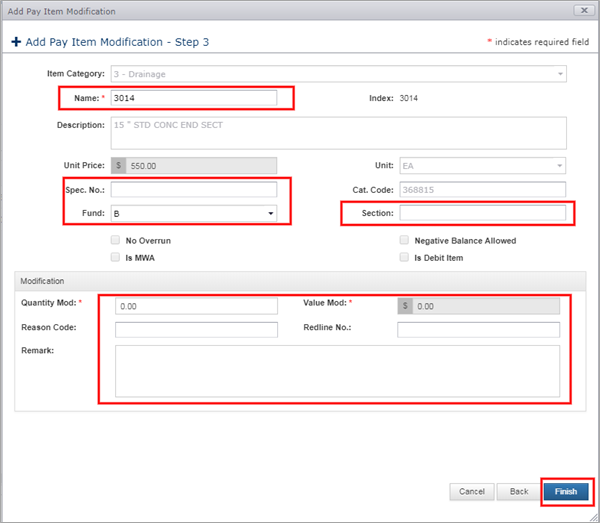
- Enter Item Name (Required)
- Enter Spec No. (Optional)
- Enter Fund Code (Optional)
- Enter Section (Optional)
- Enter Quantity (Required)
- Enter Reason Code (Optional)
- Enter Redline No. (Optional)
- Enter Remark (Optional)
- Click Finish
The new Pay Item will be displayed in the Pay Items tab grid. The Pay Item can be edited or removed before being authorized.
Next Topic: Backout an EXISTING Pay Item